Know What Normal Looks Like
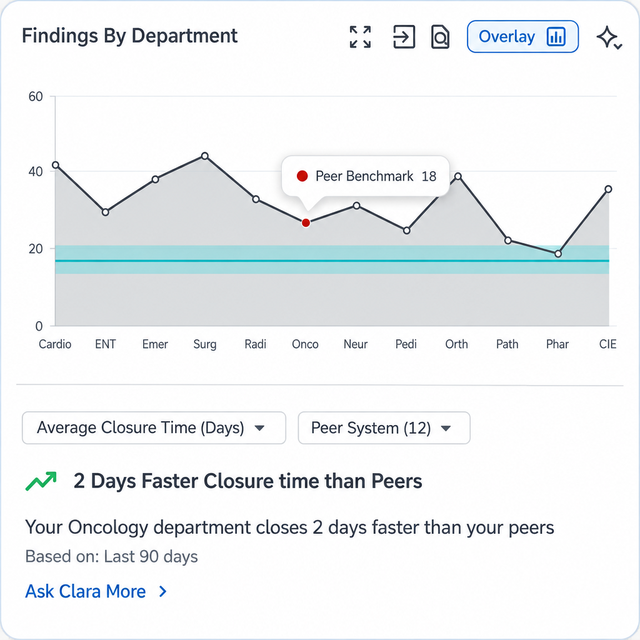
Twelve internal audit findings and thirteen patient falls in a quarter: is that a lot? Without context they are just numbers your board cannot act on. Relevance BI compares your findings, closure times and recurrence against your own history, your other facilities, and a de-identified peer group of hospitals like yours.
Survey Results

Compared to Whom, Exactly?
Benchmarking in Relevance BI
The Cohort Is Yours to Define
A benchmark is only worth reading if you know who is in it. Build your peer group from the characteristics that actually make hospitals comparable, bed-size band, ownership type, teaching status, urban or rural, region, and accrediting organization, and see how many facilities matched before you read a single number.
Against Your Own History
Start with the comparison that needs no one else's data. Track findings, nonconformities, closure times and recurrence across your own surveys and audits over years, so improvement is a line rather than an anecdote.
Across Your Own System
Rank your own facilities against each other on the same measures. Multi-site systems get the view a corporate quality office can never assemble by hand, and it creates improvement pressure without anyone having to manufacture it.
Against Your Peer Group
Opt in, and your de-identified aggregates join a pool you can then compare against, findings, internal audit results, risk scores, KPIs and survey outcomes, matched to hospitals of your size, type and accreditor.
Against the Public Record
Layer in CMS public performance data, Star Ratings, HAI measures, readmissions, and the value-based purchasing and HAC programs that attach dollars to those numbers, so quality and payment sit on one screen.
Related
Benchmarking You Can Explain to Your Compliance Officer
Comparison only works if enough organizations are willing to be compared, and organizations are only willing when the terms are clear. Here are the terms, in the same detail we would give your privacy officer.
Opt-In, at the Organization Level
Peer benchmarking is off until an authorized signer at your organization turns it on. It is not a per-user setting, not a default, and not buried in an admin toggle nobody agreed to. Turn it off and contribution stops.
Aggregates Leave, Records Never Do
Your findings, events, CAPs and free-text descriptions stay in your tenant. What contributes to a benchmark is counts and rates attached to a facility profile, twelve findings, nineteen days to close, not the findings themselves.
No Patient Data. Ever.
Nothing in the benchmarking pool is patient data. The measures are quality and compliance metadata: finding counts, standards cited, closure times, recurrence, audit results. There is no PHI to de-identify because there is no PHI in it.
Cohorts Have a Floor
A comparison only renders when the cohort contains enough facilities that no single one can be inferred from the result. Below that floor you see the cohort size and a message, not a number.
You Don't See Them. They Don't See You.
You see how your cohort was defined and how many facilities matched it. You never see which hospitals they are, and no one in that cohort ever sees that you are in it.
Public Data Needs No Permission
CMS benchmarking works whether or not you opt in, because that data is already published. Opting out costs you the private peer pool; it does not cost you the public record.
Related
- Reporting & DashboardsPut a peer comparison on the dashboard your team already opens, or export it for a board packet.
- AuditsYour internal audit findings are part of what gets benchmarked.
- Effectiveness MonitoringRecurrence rate compares cleanly because every organization defines a repeat finding the same way.
- Large SystemRunning more than a dozen facilities? Benchmarking tells a different story at your scale.
How Clara AI Enhances
Benchmarking
Clara puts your number next to the peer number and tells you what the gap means in the language your board uses. She reads the cohort, not just the value, so an outlier comes with the size of the group it is an outlier in. You decide what to do about it.

CLARA
Clarity in complianceClara reads
Clara proposes
Clara states the cohort behind every comparison, and your team confirms which gaps matter before the answer goes up.