Blog
How My Policy Keeps Every Policy Audit-Ready: Document Control Built for Surveyors
Surveyors don't just check whether you have a policy, they check whether the policy in front of them is the current, approved, correctly formatted version, whether the right people have actually seen it, and whether you can prove who approved it and when. Most hospitals still manage this through a patchwork of shared drives, email approval chains, and printed binders. That works fine until survey day, when someone can't find the current version of a policy, or worse, hands a surveyor a version that was superseded eighteen months ago.

Key takeaways
- Surveyors do not just ask whether a policy exists. They ask whether it is the current approved version, whether the right staff have seen it, and whether you can prove who signed off and when.
- Locked organization-level templates mean a policy pulled from the ED is structurally identical to one pulled from environmental services, because a document that does not fit the template cannot be published.
- Approval chains are configured to match your real review structure, and every review, sign-off, rejection, and resubmission is audit-logged against a timestamp and a named individual.
- Role-based authentication governs who can edit a document; applicability settings govern who sees it, so staff are not citing a policy that does not apply to their unit.
- Version control, automatic review reminders, formal retirement of superseded documents, and a single source of truth are the baseline a file repository with a search bar quietly fails.
Locked Templates Keep Every Policy Speaking the Same Language
MyPolicy replaces that patchwork with a single system built around one idea: nothing gets published, approved, or accessed outside of a controlled workflow. Here's how it actually enforces document control, not just claims to.
One of the most common findings during a survey isn't about content, it's about format. A radiology department's policy header doesn't match the format used in nursing. A required section is missing on half the documents pulled at random. Nobody can tell whether a document is an approved policy or an informal draft that got printed and pinned to a break-room wall.
MyPolicy lets administrators lock standardized templates at the organization level. Once a template is locked, every policy and procedure created across every department and site is required to follow that format. Authors fill in content, but they can't restructure or strip out the required elements. That means a policy pulled from the ED looks structurally identical to one pulled from environmental services, and a surveyor flipping between documents sees the same consistent format every time, because there's no way to publish one that doesn't fit the template.
Approval Workflows That Are Fully Auditable, and Fully Yours to Design
Every organization's approval chain is different. A new infection-control policy might need review from a department director, then infection prevention, then a medical staff committee, then final sign-off from the CNO. A minor procedural update might only need one approver. MyPolicy's workflow engine is built to be configured, not fixed: you define however many review steps, sign-offs, and approval chains your policies actually require.
What makes this matter for survey readiness is what happens behind the scenes. Every step in that workflow is audit-logged and tracked, every review, every sign-off, every rejection and resubmission, tied to a timestamp and to the individual who took the action. That creates a full, unbroken history for every document in the system. When a surveyor asks "who approved this and when," you're not digging through an inbox for an old email chain. You pull up the document's history and it's there, in order.
Role-Based Access: People Edit What They're Authorized to Edit, See What Applies to Them
Document control isn't only about the approval process, it's also about who can touch a document and who needs to see it. MyPolicy applies role-based authentication so editing rights are tied to a person's actual role in the organization. Staff can work on the policies within their own scope of authority without the risk of someone quietly modifying a policy that belongs to a different department, service line, or site.
The same logic runs in reverse for visibility. Applicability settings mean staff see exactly the documents that are relevant to their role, department, or site, not the entire organizational policy library. This does two things at once: it cuts down on the noise that causes staff to stop reading policies altogether, and it prevents a scenario surveyors specifically probe for, staff citing or following a policy that doesn't even apply to their unit.
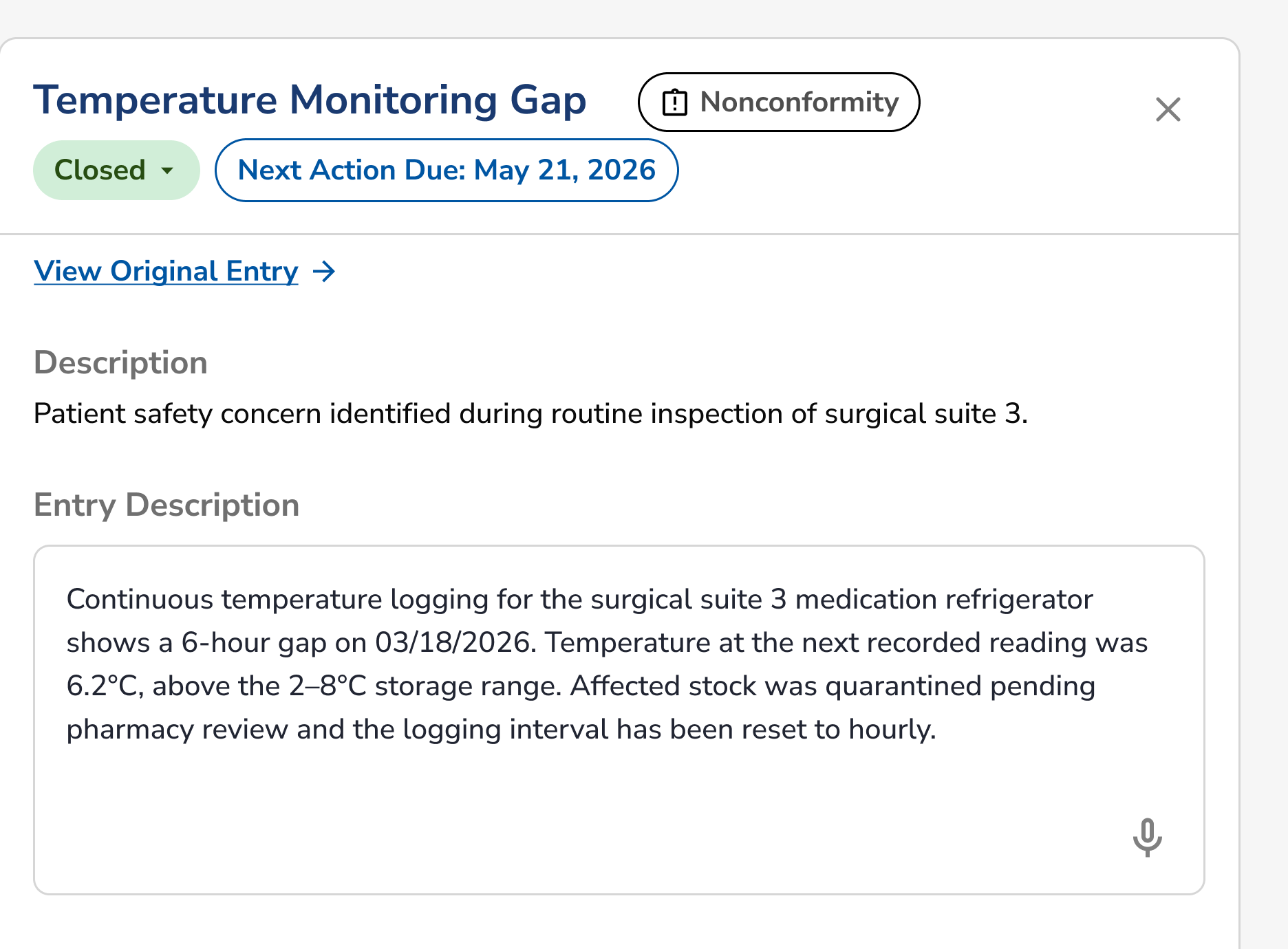
See it on your open findings.
A demo takes a nonconformity you have open right now and walks it through to a closed corrective action, the entry it came from, the similar findings it matches, and the effectiveness check that closes it.
The Fundamentals a Surveyor Still Expects
Standardized templates, workflow logging, and role-based access solve the structural problems. But document control also lives or dies on a handful of fundamentals that any accreditation body (Joint Commission, DNV NIAHO, CMS, or otherwise) expects to see functioning without exception:
- Version control. Only one version of a policy is ever "live" at a time, with prior versions retained and clearly marked as superseded rather than deleted or left ambiguous.
- Review cycles and expiration reminders. Every policy carries a review date, and upcoming or overdue reviews should surface automatically instead of relying on someone's calendar reminder or institutional memory.
- Retirement of superseded documents. When a policy is replaced, the old version needs to be formally retired, pulled from active circulation but preserved for historical and audit purposes, not left floating on a shared drive where someone might still print and use it.
- A single source of truth. One system, one current version, accessible from one place, not a policy binder on a nursing unit that hasn't been updated since the electronic version changed.
These aren't flashy features. They're the baseline any document control program is judged against, and they're the layer that catches organizations off guard when a "policy management" tool turns out to be little more than a file repository with a search bar.
Document Control That Holds Up When Someone's Watching
The organizations that struggle during a survey rarely lack policies, they lack proof. Proof that the version in front of the surveyor is current. Proof that the right people reviewed and approved it. Proof that staff are seeing what actually applies to them. MyPolicy is built around generating that proof automatically, as a byproduct of how the system works day to day, rather than as a scramble the week before survey.
If your policy program still runs on shared drives, email approvals, and manual tracking spreadsheets, it's worth seeing what a locked, workflow-driven, role-based system looks like in practice.
Ready to see MyPolicy in action? Book a demo with Medlaunch Concepts and we'll walk through how it fits your organization's approval structure, sites, and departments.
Keep reading
Related from Medlaunch
How Quality Core Closes the Loop: From Finding to Proven Fix
What happens after a policy gap becomes a finding, tracked to a fix that is proven, not assumed.
Read more →How to Build a Hospital Quality Management System on the Medlaunch Stack
Why document control is Step 1, and what every later module depends on it for.
Read more →DNV NIAHO Standards
The standards a surveyor is holding when they ask who approved this document, and when.
Read more →